| Username |
Post |
| Kiddo |
Posted
on 11-Feb-04 08:34 PM
Need help.
I've got two columns of data and I could plot a curve out of those data in Excel.
The curve looks like an exponential curve. I want to find out the function of the curve (eg y=x2+c)
Is there an option in Excel that can do give you the formula for a curve, given the curve or the data for the curve? How?
I thought my TI graphic calculator could do it.
Help.
|
| ak_karna |
Posted
on 12-Feb-04 02:31 AM
You can do like this
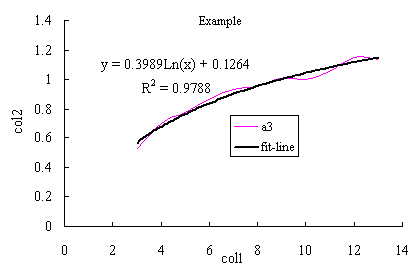
-after making the graph (xy-scattered graph) selected the curve for which you want to find the function.
-right click the curve and select draw line of fit (or similar) option. Select the type of curve you think fit for the purpose.
-after drawing the fitting line select the fitted line (right click). select set the fitting line and in the 'option' tab select display equation and the R-value if necessary. as shown in the following example.
|
| Gunaraj |
Posted
on 12-Feb-04 09:32 AM
Karnaji,
Do you know how to plot a function into a curve in excel? (just opposite of what you have done above).
For example:
1. P = 56.45 - 4.3 * ln(Q)
2. Q = expl(0.75 - 0.03*P)
Is there a way to get intetegration of a function in Excel? For example, can we integrate the above equations to given values of P or Q? I have been doing these things on Maple. If they can be done in Excel, that would be great help.
|
| The_Gentleman |
Posted
on 12-Feb-04 10:09 AM
gunaraj,
maple and other versions of it is good for numerical analysis where the sensitivity of data comes into play. excel is where u have functionality of a data! now u go figure the diference!
peace
|
| Kiddo |
Posted
on 12-Feb-04 01:25 PM
Who da man?
Karna da man.
Thanks Karna, Sajha is good for something afterall.
|
| ak_karna |
Posted
on 12-Feb-04 10:00 PM
Excel can be used for almost all kind of mathematical calculations. We can use it like any other software by making use of its visual basic component.
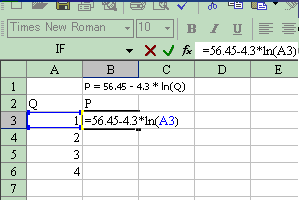
Gunaraj jee, we can plot any kind of function in excel. For that we need to first input the data and functions. As shown in the graph below. As for Integeration it should be in the following form
P=çf(Q)dQ
We can do this by using visual basic (in Excel) , i think.
Steps to draw curve of functions
in one column enter the range of values of independent variable. in the next column first raw input the function by first putting equal to (=) sign. copy this function to all the raws of the same column. After filling the values in the required range plot the function.
|